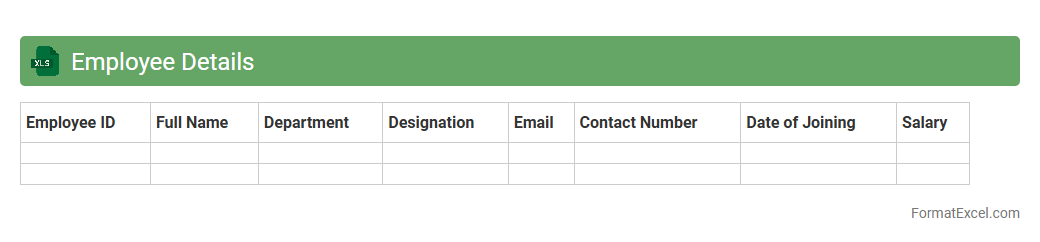
Employee Details
An
Employee Details Excel document is a structured spreadsheet that stores comprehensive information about employees, such as names, contact details, job titles, departments, and employment dates. This document streamlines HR management by enabling easy access to vital employee data, ensuring efficient payroll processing, attendance tracking, and performance evaluations. By maintaining organized and up-to-date employee records, businesses improve workforce planning and compliance with labor regulations.
Monthly Salary Statement
A
Monthly Salary Statement Excel document is a detailed record outlining employee earnings, deductions, and net pay for a specific month. It helps employers maintain accurate payroll data, ensures transparency in salary distribution, and simplifies financial audits. Employees benefit from clear documentation of their compensation, which supports budget planning and tax reporting.
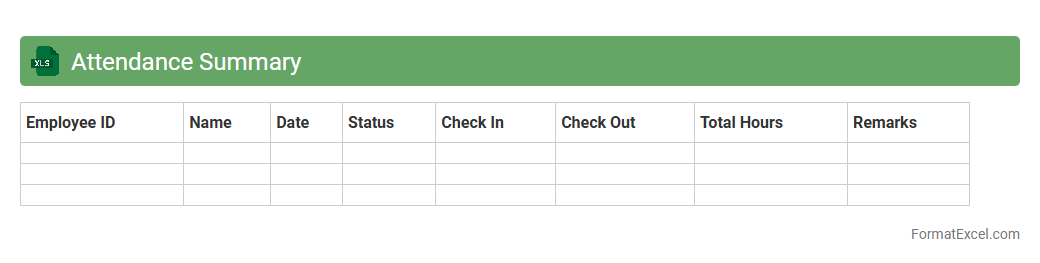
Attendance Summary
The
Attendance Summary Excel document is a structured spreadsheet that consolidates employee or student attendance data over a specific period, providing a clear overview of present, absent, late, and leave days. It is useful for tracking attendance patterns, identifying trends, and ensuring compliance with organizational or institutional policies. This document aids managers, teachers, and HR departments in making informed decisions regarding workforce management and performance evaluations.
Overtime Calculation
An
Overtime Calculation Excel document is a spreadsheet designed to automatically compute extra working hours beyond regular schedules, ensuring accuracy and saving time. It helps track employee hours, calculate pay rates for overtime, and generate reports for payroll processing, improving financial management and compliance. Utilizing such a tool enhances productivity by minimizing manual errors and streamlining workforce management.
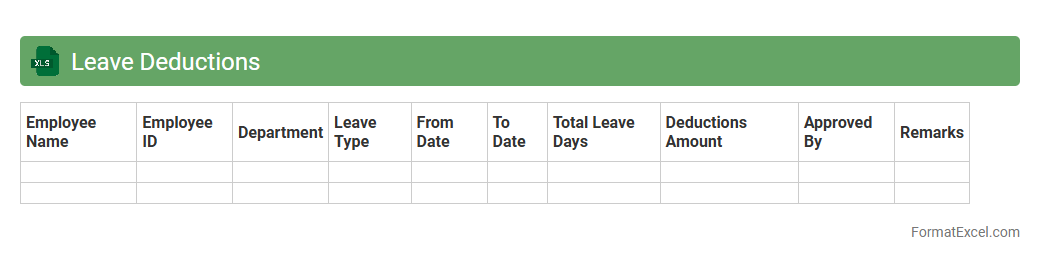
Leave Deductions
The
Leave Deductions Excel document is a spreadsheet tool designed to track and calculate employee leave balances and the corresponding salary deductions accurately. It streamlines payroll management by automatically adjusting deductions based on leave taken, ensuring precise financial records and compliance with company policies. This document improves organizational efficiency by reducing manual errors and providing clear insights into leave usage and its financial impact.
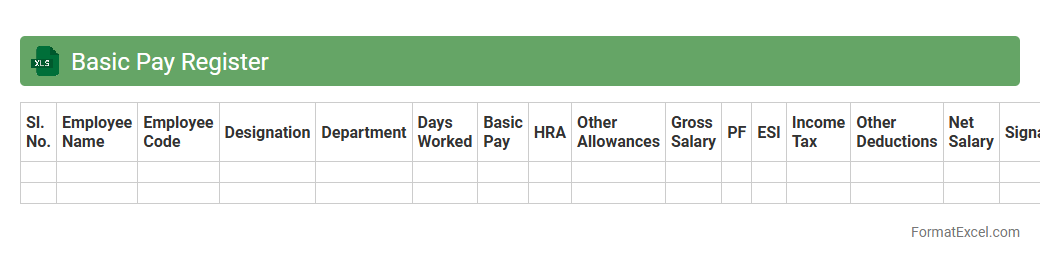
Basic Pay Register
The
Basic Pay Register Excel document is a structured spreadsheet used to record and track employees' salary details, including basic pay, allowances, and deductions. It helps organizations maintain accurate payroll records, ensures compliance with labor laws, and simplifies salary calculations. This register is essential for financial audits, generating salary slips, and analyzing payroll expenses efficiently.
Allowances Register
The
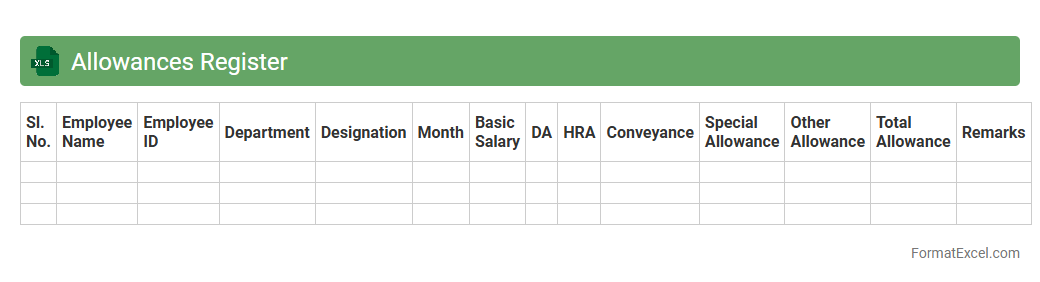
Allowances Register Excel document is a structured spreadsheet used to track and manage employee allowances, including housing, transport, and meal allowances. This register helps HR and finance teams maintain accurate records of payments, ensuring compliance with company policies and simplifying payroll processing. By providing a clear overview of allowance distribution, it enhances financial transparency and aids in budgeting and auditing efforts.
Deductions Register
The
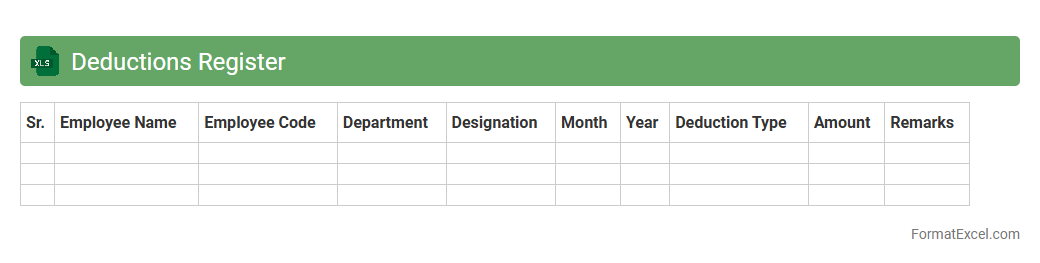
Deductions Register Excel document is a structured spreadsheet designed to track and manage all employee deductions systematically. It helps organizations maintain accurate records of various deductions such as taxes, insurance, and loan repayments, ensuring compliance with payroll regulations. This tool simplifies audit processes and enhances financial transparency by consolidating all deduction details in one accessible format.
Net Pay Register
The
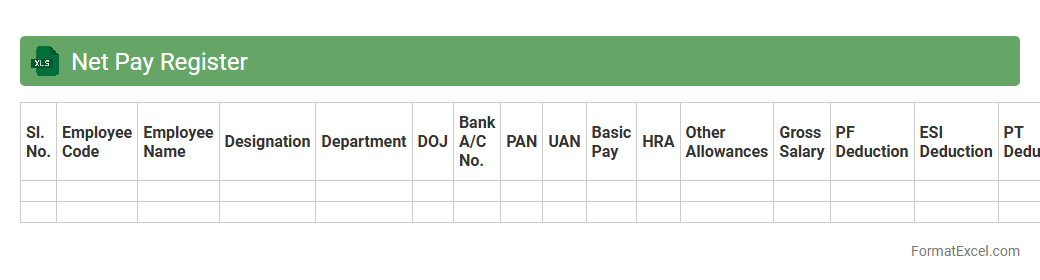
Net Pay Register Excel document is a detailed payroll record used to calculate and track employees' net salaries after deductions such as taxes, insurance, and retirement contributions. It provides a transparent and organized way to manage payroll data, ensuring accuracy in salary disbursements and compliance with tax regulations. This document helps businesses maintain financial accountability and simplifies auditing processes.
Provident Fund Contribution
A
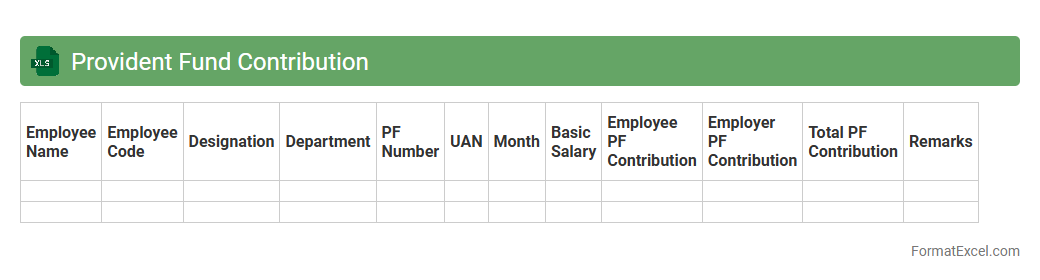
Provident Fund Contribution Excel document is a structured spreadsheet designed to track and calculate employee and employer contributions to the Provident Fund accurately. It helps automate the process of managing monthly deductions, interest calculations, and cumulative balances, ensuring compliance with regulatory requirements. This tool significantly improves financial management efficiency and provides clear insights into retirement savings progress.
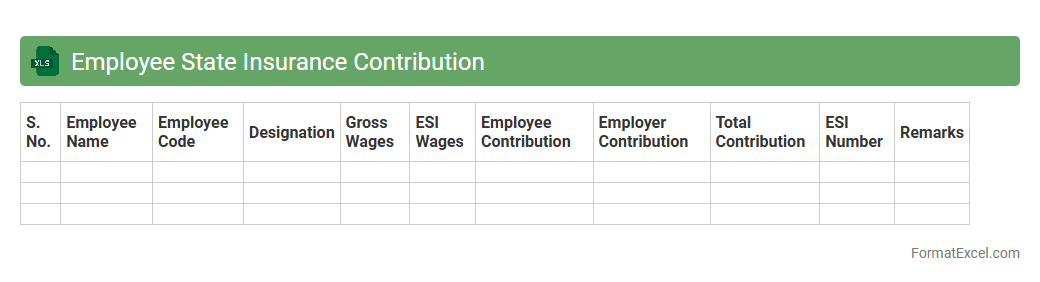
Employee State Insurance Contribution
The
Employee State Insurance Contribution Excel document is a structured spreadsheet designed to calculate and track the mandatory insurance premiums deducted from employees' salaries under the Employee State Insurance Act. This tool helps employers systematically manage monthly contributions, ensuring compliance with legal requirements while maintaining accurate records for audits and financial planning. By automating calculations and consolidating data, the document reduces errors and simplifies the process of reporting payments to the Employee State Insurance Corporation (ESIC).
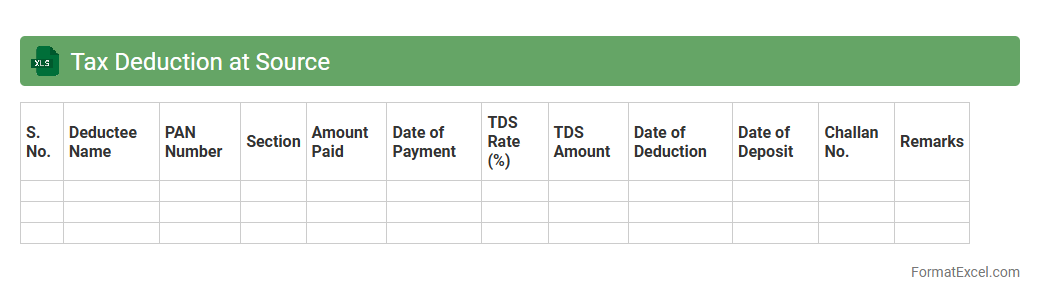
Tax Deduction at Source
A
Tax Deduction at Source (TDS) Excel document is a structured spreadsheet designed to record and calculate the amounts of tax deducted at the point of payment, ensuring compliance with tax regulations. It facilitates the tracking of TDS entries, total deductions, and payments made to tax authorities, simplifying tax filing and audit processes. This tool is especially useful for businesses and individuals to maintain accurate financial records, reduce errors in tax calculations, and generate detailed reports for financial management and tax submission.
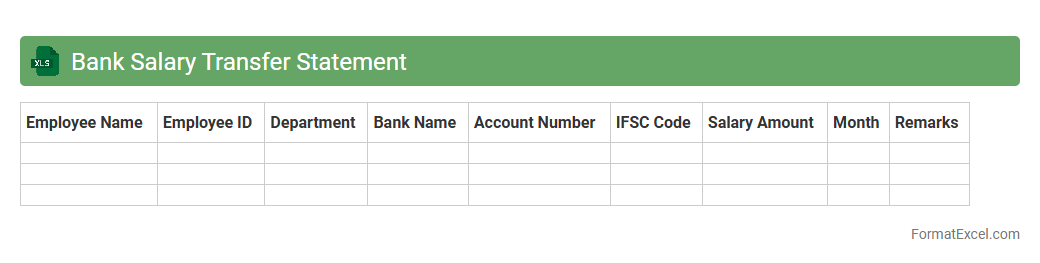
Bank Salary Transfer Statement
A
Bank Salary Transfer Statement Excel document is a detailed record that tracks salary payments made by an employer to employees through bank transfers. It organizes transaction data including dates, amounts, employee names, and bank details, enabling easy reconciliation and financial auditing. This document is crucial for payroll management, ensuring accuracy in salary distributions and facilitating transparency in financial reporting.
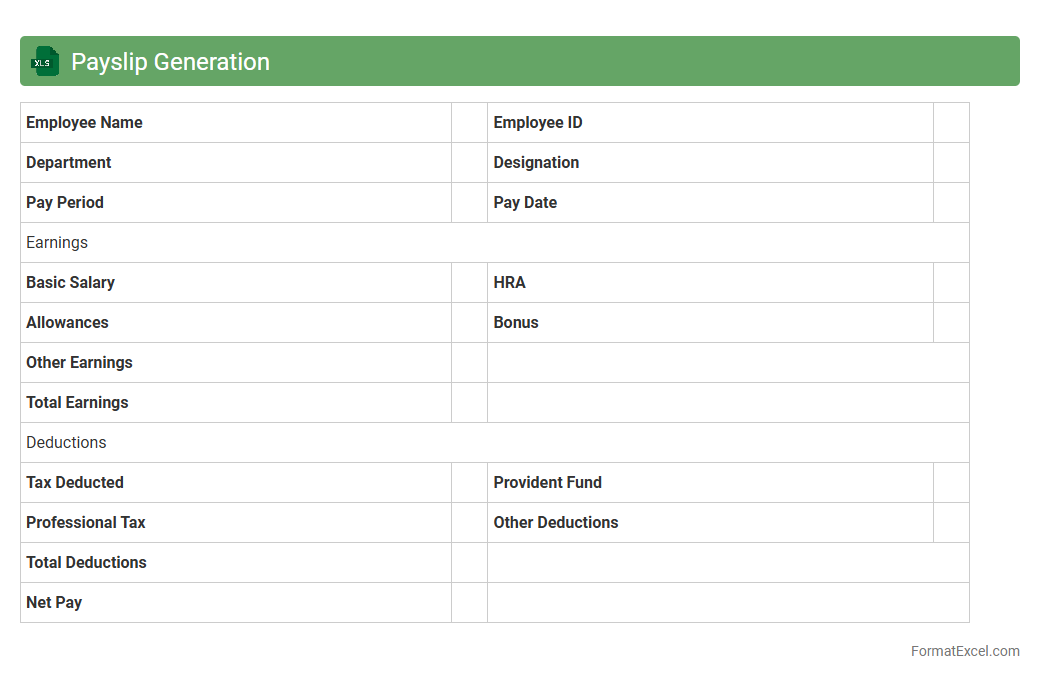
Payslip Generation
Payslip Generation Excel document is a
digital tool designed to automate the creation of employee salary slips, making payroll processing efficient and error-free. It allows businesses to input salary components, deductions, and taxes to generate detailed payslips that comply with statutory requirements. This tool enhances accuracy, saves time, and ensures transparent communication of payment details to employees.
Salary Advance Recovery
The
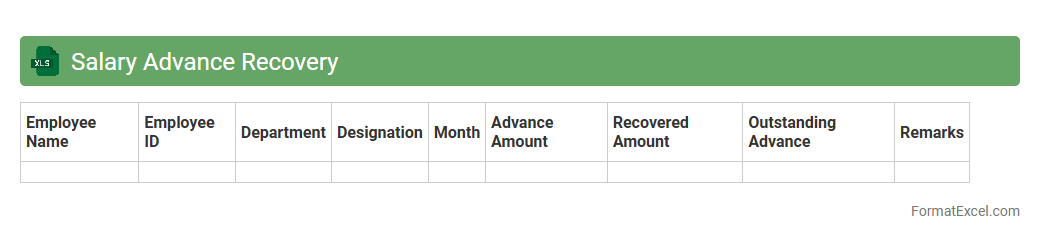
Salary Advance Recovery Excel document is a specialized spreadsheet designed to track and manage the repayment of salary advances given to employees. It enables accurate recording of advance amounts, installment schedules, and outstanding balances, ensuring transparent and systematic recovery. This document proves essential for payroll management by minimizing errors, enhancing financial tracking, and facilitating timely recovery of salary advances.
Loan Recovery Statement
A
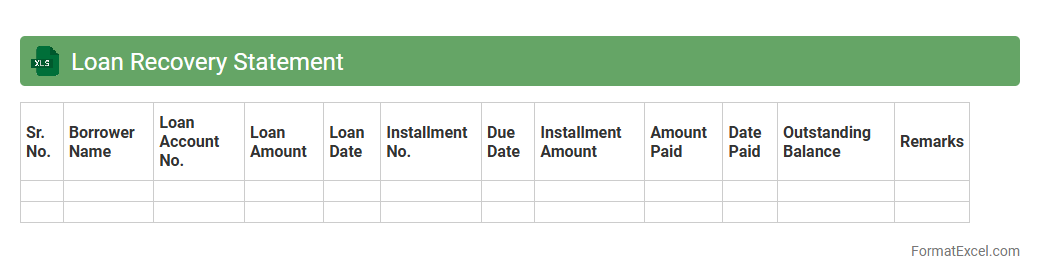
Loan Recovery Statement Excel document is a structured spreadsheet designed to track and record loan repayments, outstanding balances, and recovery progress over time. It helps lenders efficiently monitor borrower payments, identify delinquent accounts, and maintain accurate financial records for better loan portfolio management. Using this document enhances transparency, facilitates timely recovery actions, and supports informed decision-making for credit risk assessment.
Bonus Register
The
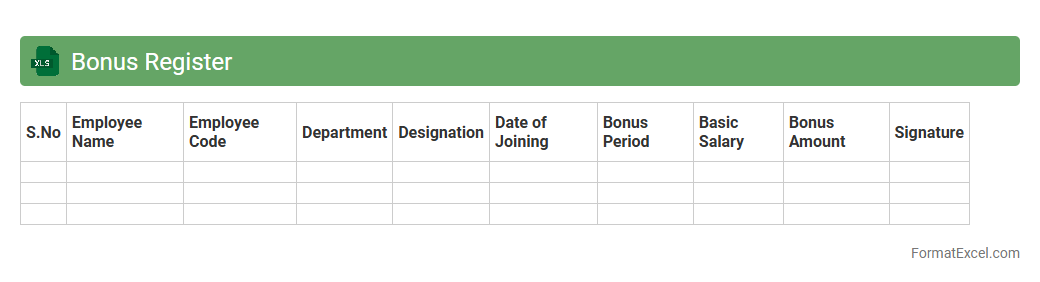
Bonus Register Excel document is a structured spreadsheet used to track and record employee bonuses within an organization. It consolidates bonus data such as amounts, eligibility criteria, payment dates, and approval status, enabling transparent and efficient management of incentive payouts. This tool is useful for payroll accuracy, financial planning, and ensuring compliance with company bonus policies.
Gratuity Calculation
A
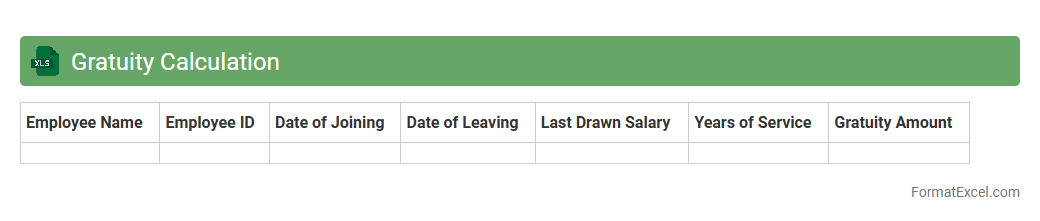
Gratuity Calculation Excel document is a spreadsheet tool designed to accurately compute employee gratuity payments based on tenure, last drawn salary, and applicable legal regulations. It streamlines the complex calculations involved, ensuring compliance with statutory guidelines such as the Payment of Gratuity Act. This tool is invaluable for HR professionals and employers to efficiently determine end-of-service benefits, reduce errors, and maintain transparent financial records.
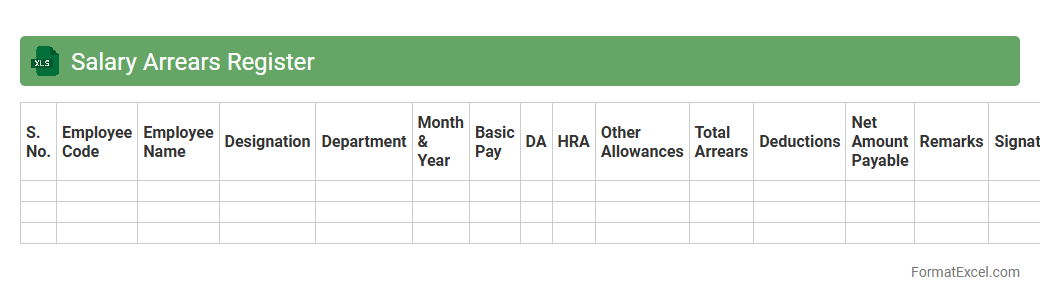
Salary Arrears Register
A
Salary Arrears Register Excel document is a detailed record that tracks delayed or unpaid salary payments owed to employees over a specific period. It helps organizations maintain accurate financial accounts by documenting arrears amounts, dates, employee details, and payment status. This register is essential for ensuring transparency, timely settlement of dues, and simplifying payroll audits.
Increment Register
An
Increment Register Excel document is a structured spreadsheet used to systematically record and track employee salary increments over time. It helps organizations maintain transparent records of pay raises, ensuring accuracy in payroll processing and compliance with compensation policies. This tool enhances data management by allowing easy updates, detailed analysis, and reporting on salary progression trends within the company.
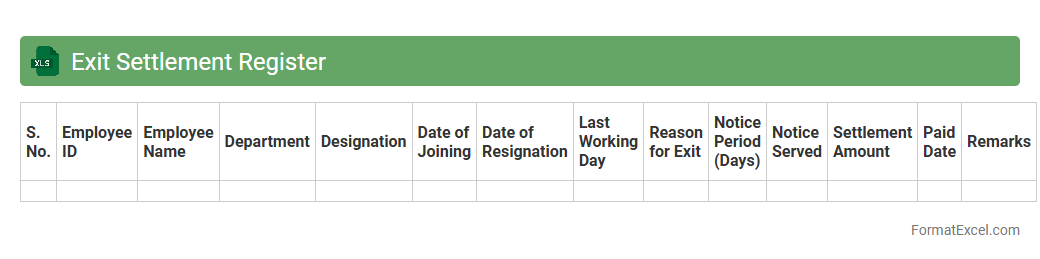
Exit Settlement Register
The
Exit Settlement Register Excel document is a comprehensive record used to track employee exit settlements, including final salary, gratuity, and other financial dues. It organizes critical data such as employee details, settlement amounts, payment dates, and approval statuses, facilitating streamlined processing and audit readiness. This register enhances transparency, ensures compliance with company policies, and simplifies the reconciliation of exit payments.
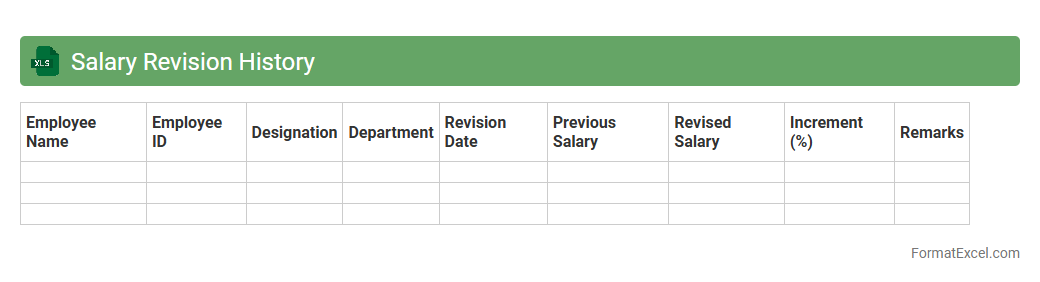
Salary Revision History
A
Salary Revision History Excel document records all past salary changes for employees, including dates, percentage increases, and new salary amounts. This detailed log helps HR professionals track compensation trends, ensure compliance with company policies, and facilitate transparent communication during performance reviews. Maintaining this history supports data-driven decisions for future salary adjustments and budgeting.
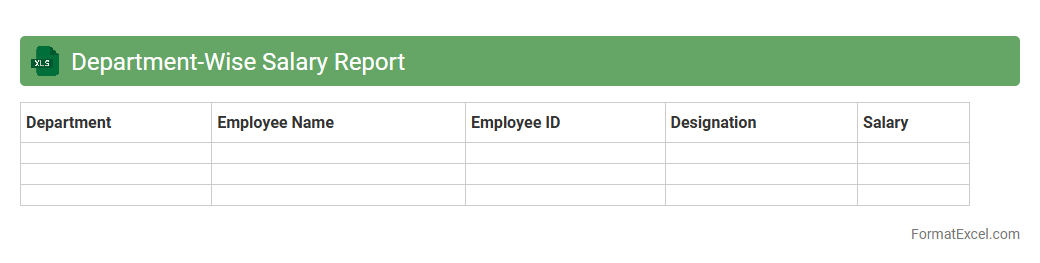
Department-Wise Salary Report
A
Department-Wise Salary Report Excel document systematically organizes employee salary data by each department, enabling clear visibility into payroll expenses across the organization. It assists HR and finance teams in budgeting, identifying salary distribution trends, and ensuring equitable compensation within various departments. This report streamlines decision-making by providing accurate, department-specific salary insights in a concise, easy-to-analyze format.
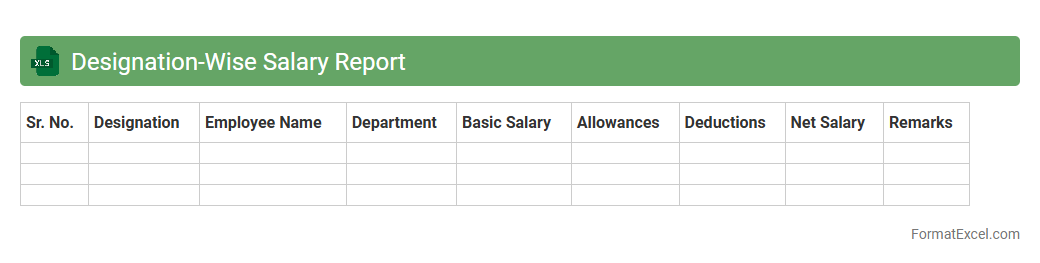
Designation-Wise Salary Report
The
Designation-Wise Salary Report Excel document organizes employee salary data based on their job titles, enabling clear insights into compensation patterns across various roles. It allows HR and management teams to conduct salary benchmarking, identify disparities, and make informed decisions regarding payroll adjustments. This report enhances transparency and supports strategic workforce planning by providing a detailed, role-specific overview of salary distribution.
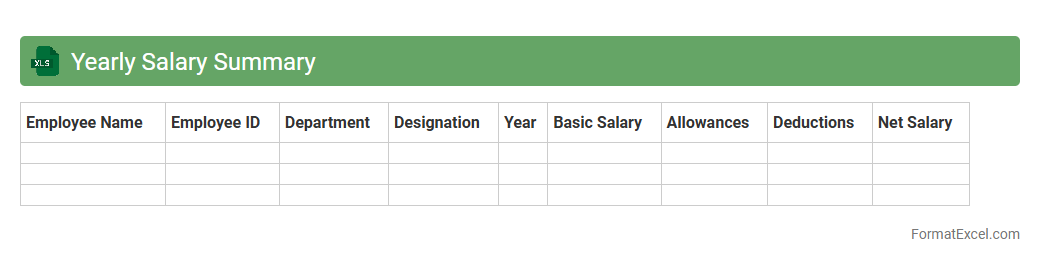
Yearly Salary Summary
A
Yearly Salary Summary Excel document consolidates an individual's or organization's salary data over a full year, including monthly wages, bonuses, deductions, and net pay. It provides a comprehensive overview that aids in budget planning, tax preparation, and financial analysis by clearly displaying salary trends and total compensation. Employers and employees benefit from this organized format to track income accurately and ensure compliance with financial regulations.
Introduction to Salary Register Formats
A salary register is a systematic record of employee salaries, including earnings, deductions, and net pay. It offers a clear overview of payroll activities essential for financial tracking. Using a structured format simplifies payroll management and ensures accuracy.
Importance of Maintaining a Salary Register
Maintaining a salary register is crucial for compliance with tax laws and auditing requirements. It helps avoid discrepancies in payments and supports transparent salary disbursement. Accurate records enhance employee trust and financial accountability.
Key Components of a Salary Register in Excel
A salary register typically includes employee details, gross salary, deductions, and net salary. Excel allows easy addition of columns for bonuses, tax, and provident fund contributions. The key components ensure comprehensive payroll documentation.
Step-by-Step Guide to Creating a Salary Register in Excel
Start by creating columns for employee ID, name, designation, and salary details. Use Excel formulas to calculate deductions and net pay automatically. Implement data validation to avoid errors and maintain data integrity.
Essential Columns in a Salary Register Format
Critical columns include Employee Name, Basic Pay, Allowances, Deductions, and Net Salary. Additional columns like Tax, Provident Fund, and Payment Date enhance record completeness. These essential columns form the backbone of any salary register.
Sample Salary Register Template in Excel
A sample template should have a clean layout with headers and calculated fields for easy use. Templates often include auto-sum features and conditional formatting for quick analysis. Utilizing a sample template speeds up salary management and reduces errors.
Customization Tips for Excel Salary Registers
Customize your salary register by adding company-specific allowances or deductions. Use conditional formatting for highlighting discrepancies or delayed payments. Regular updates and version control are important for customization and accuracy.
Common Mistakes to Avoid in Salary Register Management
Avoid errors like incorrect formula entries, missing employee data, and inconsistent formats. Failing to update records and ignoring backups can lead to payroll issues. Preventing these common mistakes ensures a reliable salary register.
Advantages of Using Excel for Salary Registers
Excel provides flexibility, easy data manipulation, and robust formula support for payroll management. It is cost-effective and widely accessible without requiring specialized software. The advantages include improved accuracy and time-saving automation.
Downloadable Salary Register Excel Format Templates
Many websites offer free downloadable Excel templates for different salary register needs. These templates save setup time and come preloaded with essential formulas. Using a downloadable template facilitates quick and efficient payroll processing.