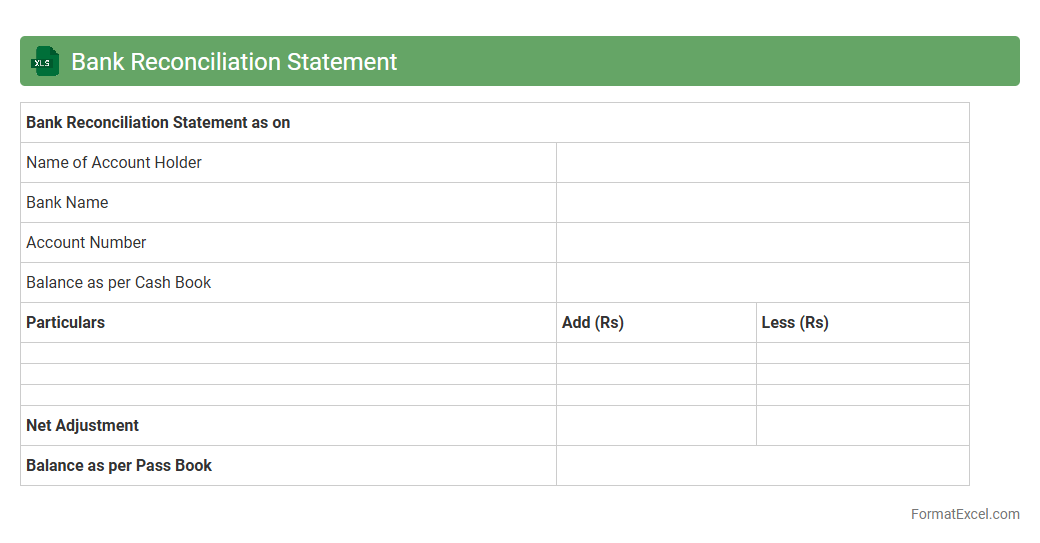
Bank Reconciliation Statement
A
Bank Reconciliation Statement Excel document is a financial tool used to compare and reconcile the balances between a company's bank statement and its own accounting records. It helps identify discrepancies caused by timing differences, errors, or unauthorized transactions, ensuring accurate financial reporting. This document is essential for maintaining accurate cash flow management, detecting fraud, and preventing financial misstatements.
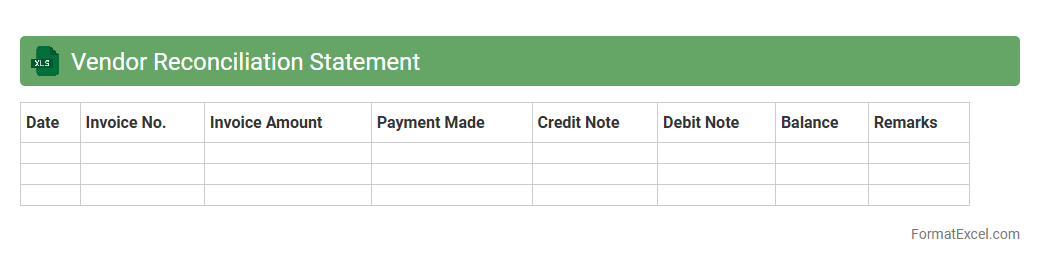
Vendor Reconciliation Statement
A
Vendor Reconciliation Statement Excel document is a financial tool used to match and verify transactions between a company's records and its vendor's accounts, ensuring accuracy and resolving discrepancies. It helps businesses track outstanding invoices, payments made, and identify any errors or omissions in billing, improving financial transparency and vendor relationship management. By systematically organizing data, this statement supports efficient audit processes and timely decision-making in accounts payable.
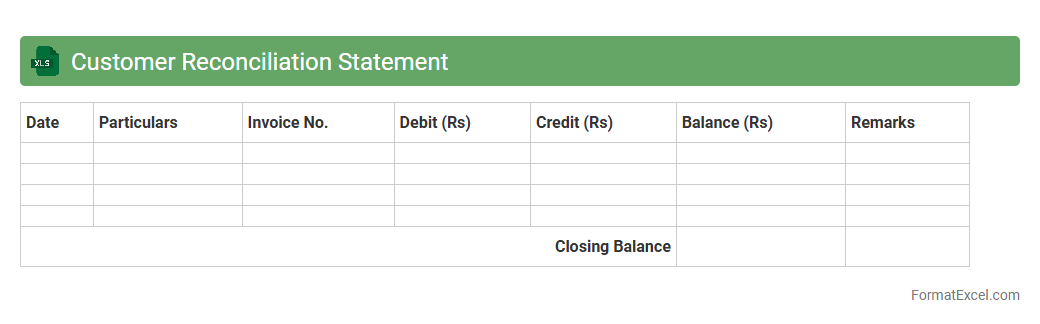
Customer Reconciliation Statement
A
Customer Reconciliation Statement Excel document is a financial tool used to compare the company's records of customer accounts with the customers' statements to ensure accuracy and resolve discrepancies. It helps businesses identify unpaid invoices, outstanding balances, and errors in billing, contributing to improved cash flow management and strengthened customer relationships. This document streamlines the reconciliation process, reduces accounting errors, and supports efficient financial auditing.
Intercompany Reconciliation Statement
The
Intercompany Reconciliation Statement Excel document is a financial tool designed to compare and align transactions between different departments or subsidiaries within the same organization. It helps identify discrepancies, ensuring accurate reporting and consistency across internal accounts. Using this document enhances transparency, streamlines audit processes, and supports efficient financial management.
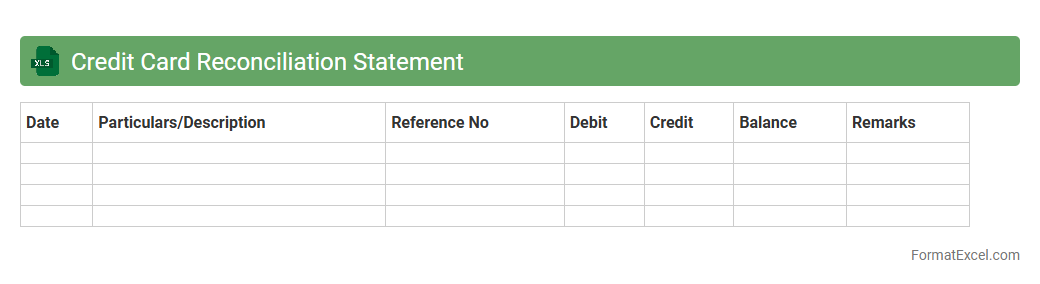
Credit Card Reconciliation Statement
A
Credit Card Reconciliation Statement Excel document is a tool used to match and verify credit card transactions against bank or credit card statements. This document helps identify discrepancies such as unauthorized charges, missed payments, or errors, ensuring accurate financial records. It is essential for maintaining financial transparency, preventing fraud, and streamlining accounting processes for businesses and individuals.
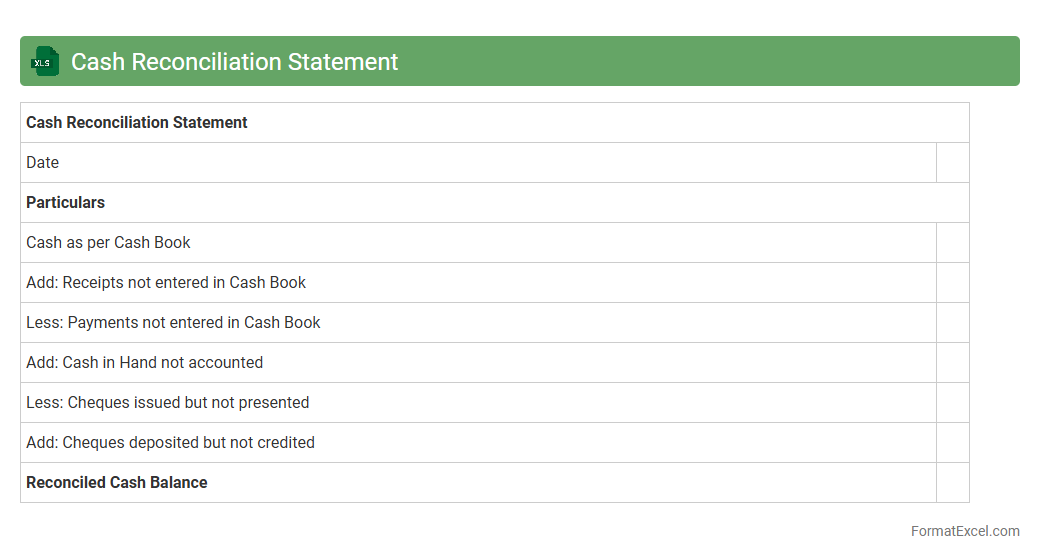
Cash Reconciliation Statement
A
Cash Reconciliation Statement Excel document is a financial tool used to compare and verify the cash balance recorded in an organization's books with the actual cash on hand. It helps identify discrepancies arising from errors, omissions, or fraud, ensuring accuracy in cash management. This document is essential for maintaining transparent financial records, aiding in effective cash flow control and audit readiness.
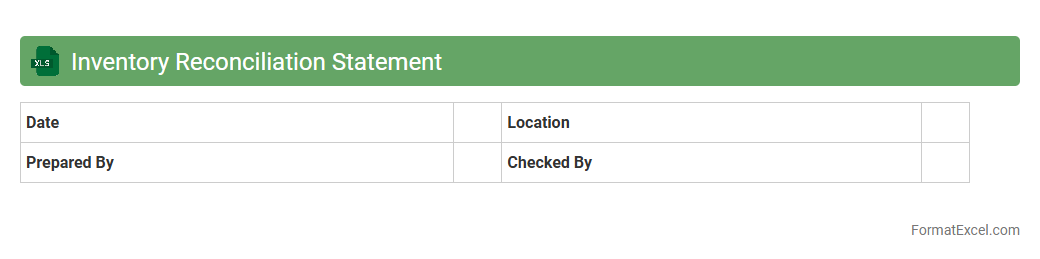
Inventory Reconciliation Statement
An
Inventory Reconciliation Statement Excel document is a tool designed to compare and verify physical stock counts against recorded inventory data, ensuring accuracy and consistency in inventory records. It helps identify discrepancies such as shortages, excesses, or misplacements by detailing adjustments needed to align the inventory system with actual stock. This process enhances inventory management, reduces errors, and supports informed decision-making in supply chain and financial reporting.
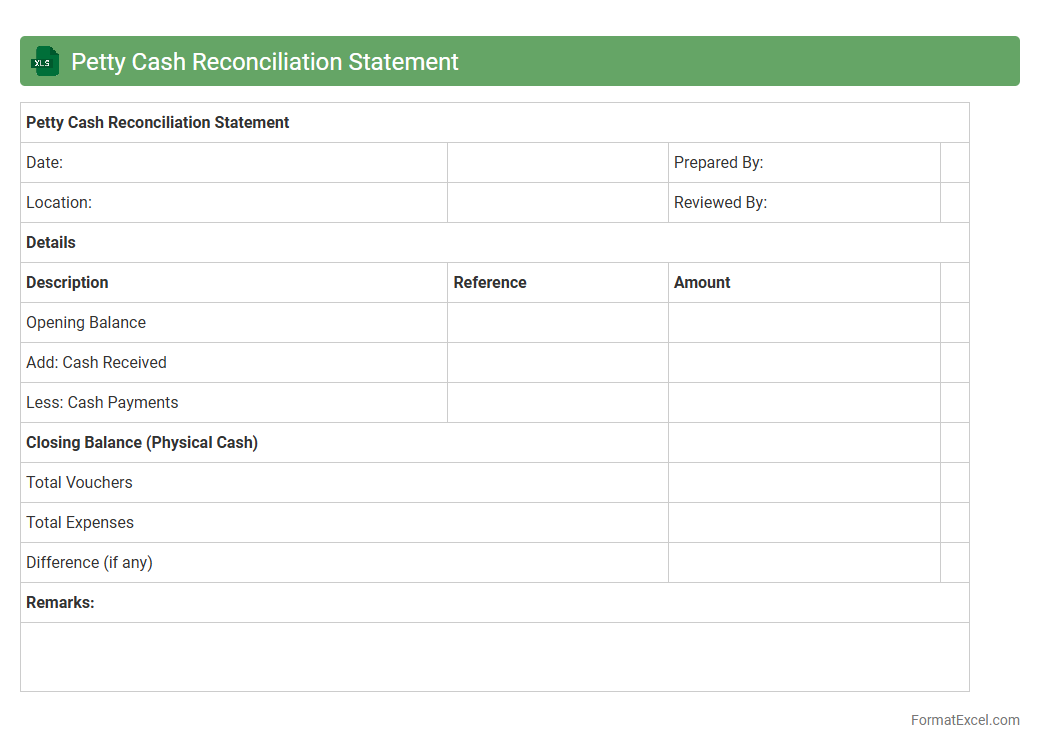
Petty Cash Reconciliation Statement
A
Petty Cash Reconciliation Statement Excel document is a financial tool used to track and verify small cash expenses within an organization, ensuring that the petty cash fund is accurately accounted for. It helps maintain transparency by comparing the opening balance, cash inflows, outflows, and the closing balance, reducing errors and discrepancies. This document is essential for efficient cash management, preventing fraud, and facilitating easy audits.
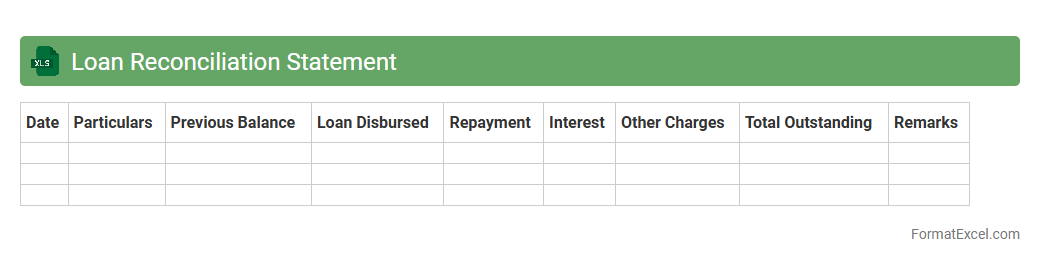
Loan Reconciliation Statement
A
Loan Reconciliation Statement Excel document is a financial tool designed to track and verify loan transactions, ensuring that the lender's and borrower's records match accurately. It helps identify discrepancies between loan balances, payments, and interest calculations, providing a clear view of the outstanding loan amount. This document is essential for maintaining accurate financial records, preventing errors, and facilitating efficient loan management.
GST Reconciliation Statement
The
GST Reconciliation Statement Excel document is a structured spreadsheet designed to compare and match the GST returns filed with the actual business transactions recorded in accounting books. It helps identify discrepancies between GSTR-1, GSTR-2A, and GSTR-3B, ensuring accurate tax reporting and compliance with GST regulations. Using this tool enhances financial accuracy, minimizes errors in tax filing, and aids in timely rectification of mismatches to avoid penalties.
Payroll Reconciliation Statement
A
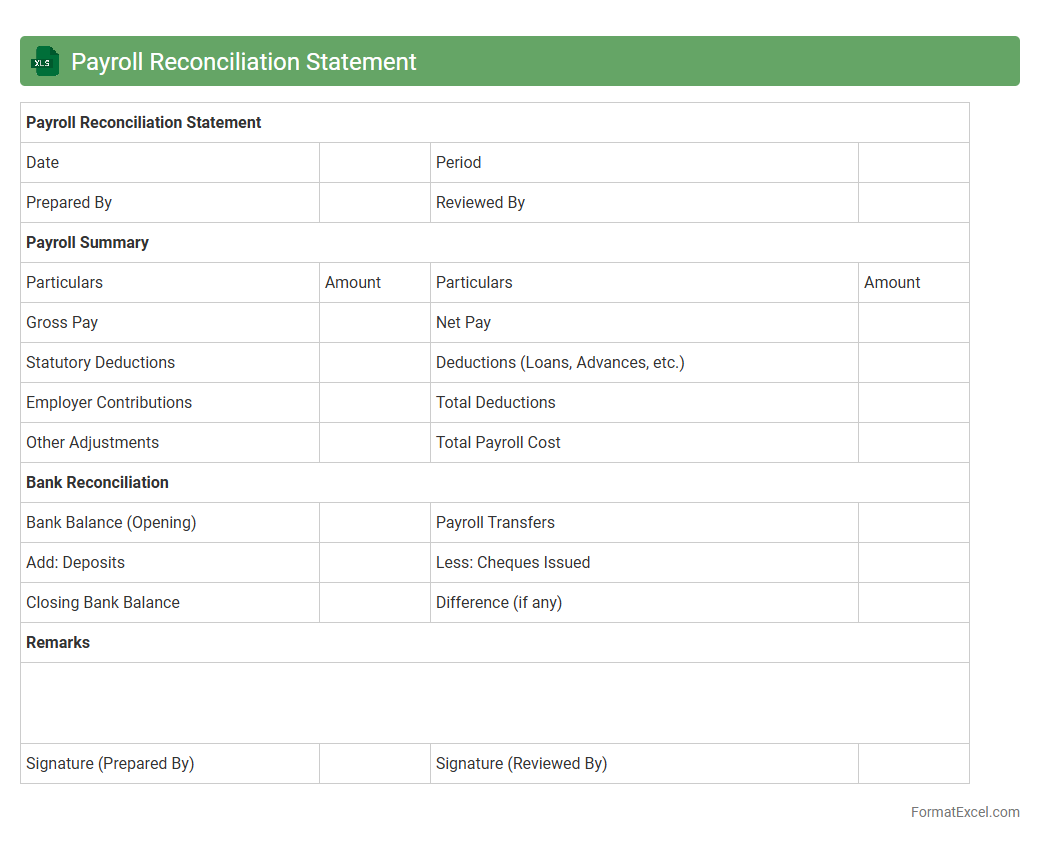
Payroll Reconciliation Statement Excel document is a detailed report that compares total payroll expenses recorded in the accounting system with actual payments made to employees. It helps identify discrepancies such as underpayments, overpayments, or unrecorded transactions, ensuring accurate financial records and compliance with tax regulations. This document is essential for maintaining payroll accuracy, facilitating audits, and improving financial transparency within an organization.
Receivables Reconciliation Statement
A
Receivables Reconciliation Statement Excel document is a financial tool designed to compare and verify accounts receivable balances between a company's ledger and customer statements. It helps identify discrepancies, overdue payments, and ensures accurate tracking of outstanding invoices. This reconciliation process enhances cash flow management, reduces errors, and improves financial reporting accuracy.
Payables Reconciliation Statement
A
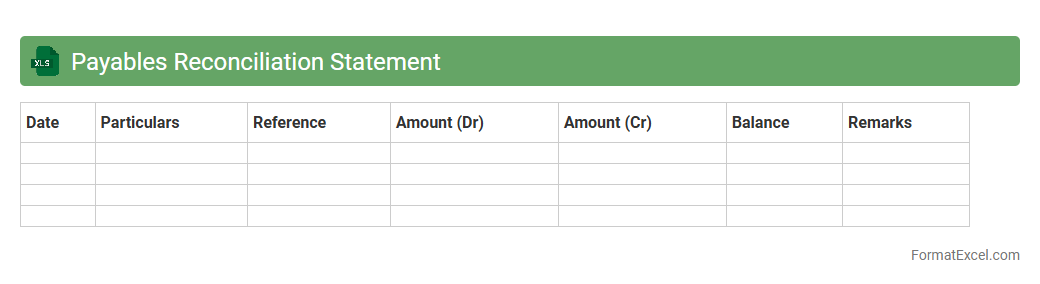
Payables Reconciliation Statement Excel document is a detailed financial report used to verify and match the amounts owed to suppliers or vendors against the organization's accounting records. It helps identify discrepancies, outstanding payments, and ensures accuracy in financial reporting by cross-checking purchase orders, invoices, and payment records. Businesses rely on this tool to maintain transparent vendor relationships, prevent payment errors, and manage cash flow efficiently.
Fixed Assets Reconciliation Statement
A
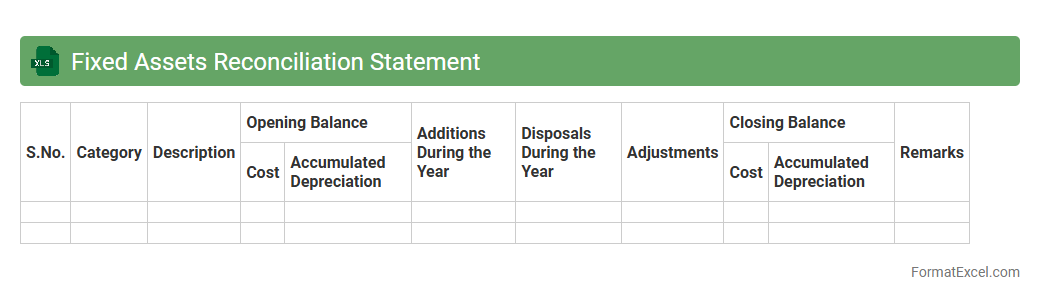
Fixed Assets Reconciliation Statement Excel document systematically tracks and verifies the acquisition, depreciation, and disposal of fixed assets within an organization, ensuring accuracy between asset registers and financial records. It helps identify discrepancies, supports compliance with accounting standards, and enhances transparency in asset management. This document is essential for maintaining up-to-date asset valuation, facilitating audits, and optimizing financial reporting.
General Ledger Reconciliation Statement
A
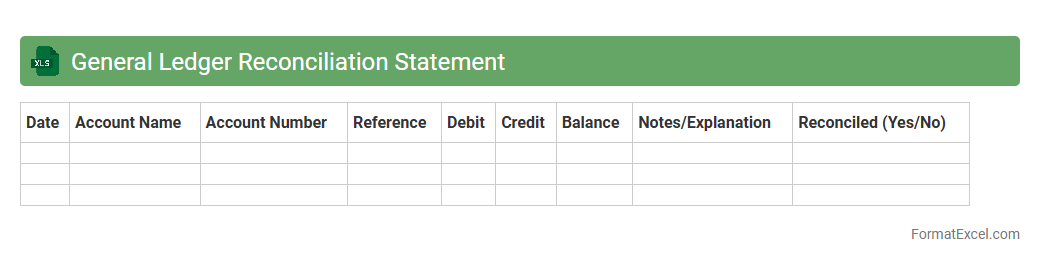
General Ledger Reconciliation Statement Excel document is a financial tool used to compare and verify account balances between the general ledger and supporting documents, ensuring accuracy and consistency in accounting records. It helps identify discrepancies or errors by systematically matching transactions, facilitating timely corrections and audit readiness. This reconciliation process enhances financial transparency, improves internal controls, and supports effective decision-making by providing reliable and up-to-date financial data.
Balance Sheet Reconciliation Statement
A
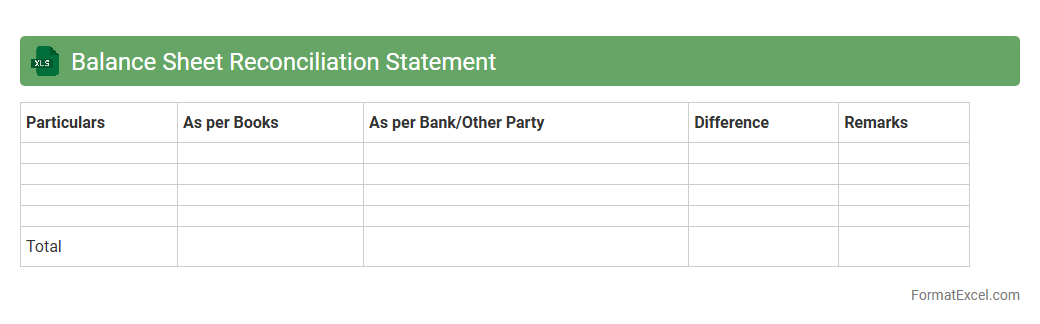
Balance Sheet Reconciliation Statement Excel document systematically compares and verifies the balances of assets, liabilities, and equity accounts to ensure accuracy in financial records. This tool helps identify discrepancies, prevents errors, and enhances financial transparency by providing a clear, organized view of account reconciliations. Using this document improves audit readiness and supports effective financial decision-making by maintaining the integrity of the balance sheet data.
Advance Payment Reconciliation Statement
An
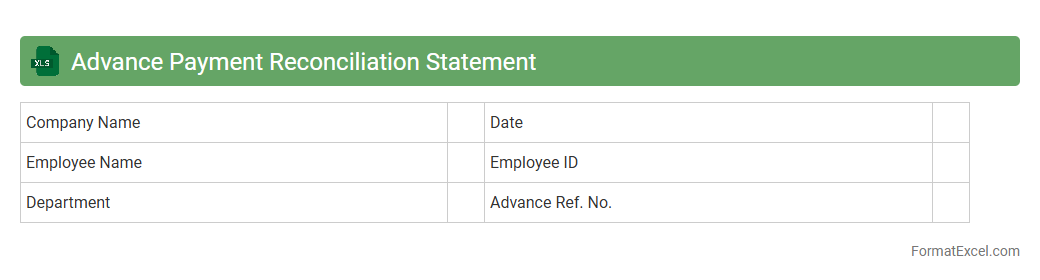
Advance Payment Reconciliation Statement Excel document is a financial tool designed to track, verify, and reconcile advance payments made against invoices or contracts. It helps businesses ensure accuracy in payment records, identify discrepancies, and maintain clear audit trails. Utilizing this statement enhances financial transparency and aids in efficient cash flow management.
Prepaid Expenses Reconciliation Statement
A
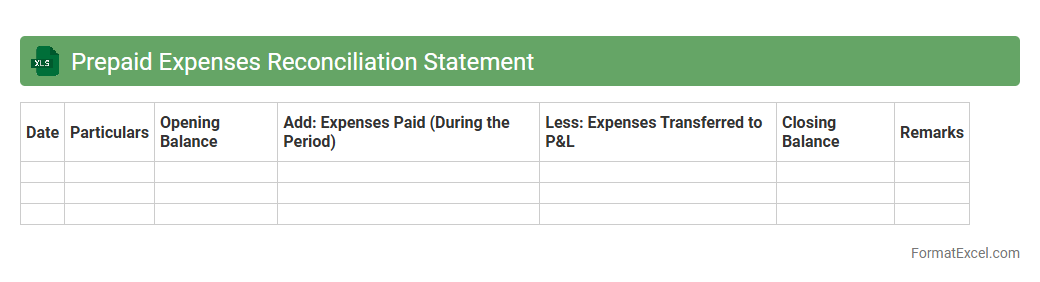
Prepaid Expenses Reconciliation Statement Excel document systematically tracks and matches prepaid expense balances with actual expenses incurred over a specific period. This tool ensures accurate financial reporting by verifying that prepaid amounts align correctly with the corresponding expense recognition, preventing discrepancies in accounting records. Utilizing this statement enhances budgeting accuracy and improves cash flow management by clearly identifying unexpired prepaid costs.
Expense Reconciliation Statement
An
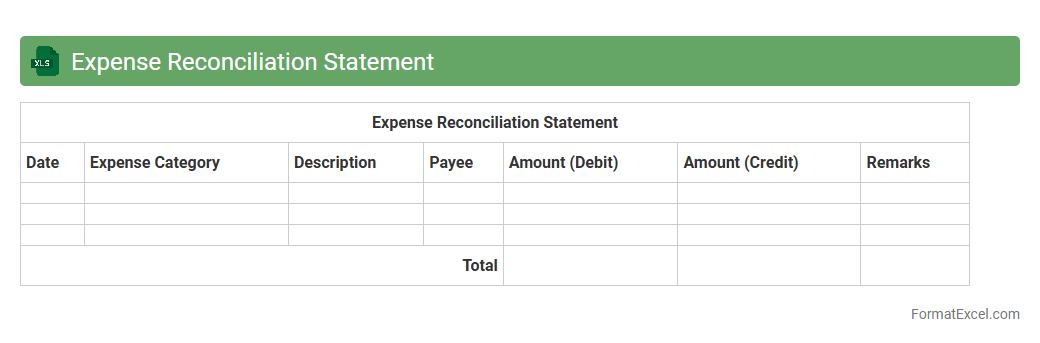
Expense Reconciliation Statement Excel document is a detailed financial tool used to match and verify expenses against corresponding payments or receipts, ensuring accuracy and transparency. It helps identify discrepancies, prevent fraud, and maintain organized financial records for businesses or individuals. This document streamlines the auditing process and supports effective budgeting by tracking all expenditure flows methodically.
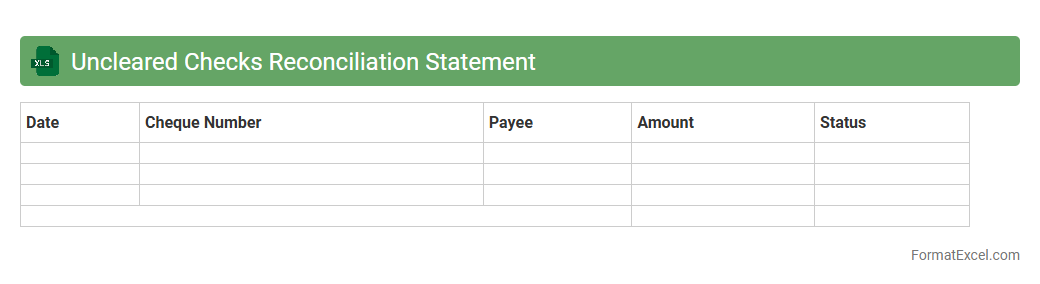
Uncleared Checks Reconciliation Statement
The
Uncleared Checks Reconciliation Statement Excel document is a financial tool used to track and reconcile checks that have been issued but have not yet cleared the bank. This statement helps businesses identify discrepancies between their cash book and bank statement, ensuring accurate cash flow management and preventing potential fraud or accounting errors. By regularly updating this document, organizations can maintain reliable financial records and improve their cash management processes.
Accrued Liabilities Reconciliation Statement
The
Accrued Liabilities Reconciliation Statement Excel document systematically tracks and matches accrued expenses against corresponding liabilities, ensuring accuracy in financial records. It helps identify discrepancies, supports audit processes, and facilitates timely adjustments for liabilities that are incurred but not yet paid. This reconciliation enhances financial transparency and aids in precise budget forecasting and cash flow management.
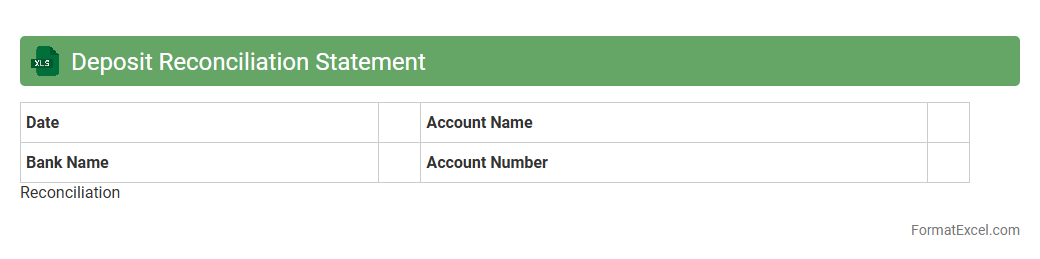
Deposit Reconciliation Statement
A
Deposit Reconciliation Statement Excel document is a financial tool used to compare and verify deposit records between a company's cash book and bank statements. It helps identify discrepancies such as uncredited deposits, errors, or fraud, ensuring accurate financial reporting and effective cash management. This document streamlines the reconciliation process, saving time and improving the accuracy of financial audits.
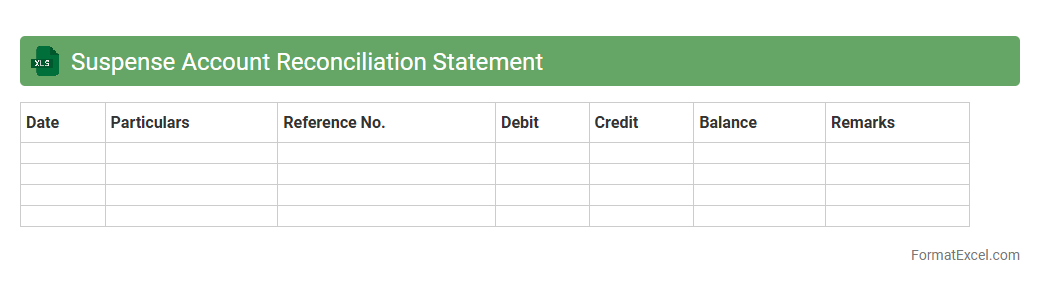
Suspense Account Reconciliation Statement
A
Suspense Account Reconciliation Statement Excel document is a financial tool used to identify and resolve discrepancies in suspense accounts, where unclassified transactions are temporarily recorded. This statement helps maintain accurate financial records by systematically analyzing unmatched entries, ensuring proper allocation, and preventing errors in financial reporting. Utilizing this reconciliation process streamlines accounting operations and enhances the accuracy of financial statements.
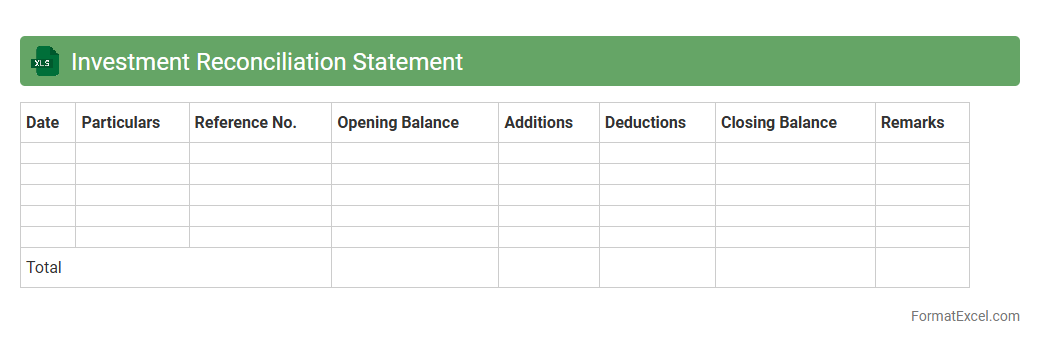
Investment Reconciliation Statement
An
Investment Reconciliation Statement Excel document tracks and verifies the accuracy of investment records by comparing internal records with external statements, ensuring consistency and identifying discrepancies. It is useful for maintaining transparent financial reporting, preventing errors, and facilitating audit processes. This tool helps investors and financial managers monitor portfolio performance and validate transaction details efficiently.
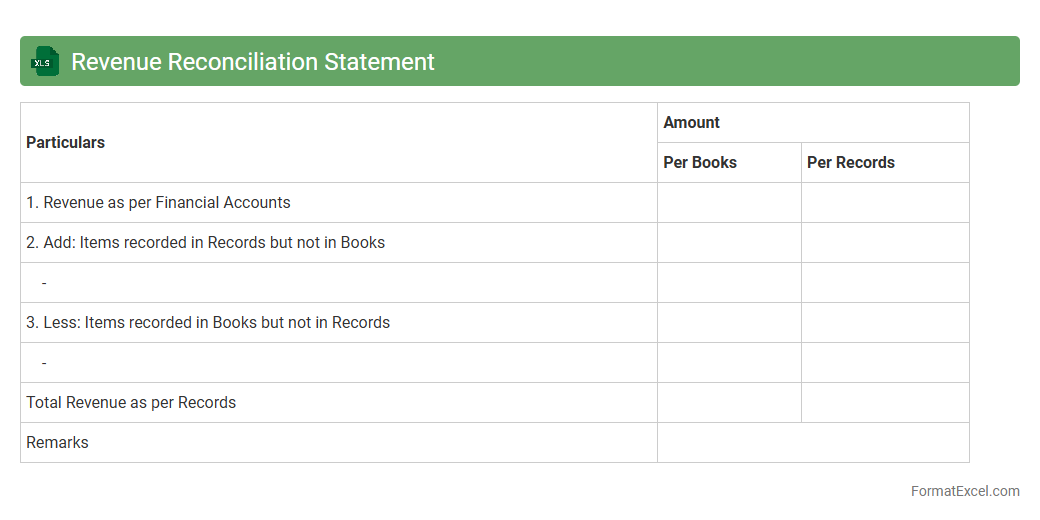
Revenue Reconciliation Statement
A
Revenue Reconciliation Statement Excel document is a financial tool used to compare and verify revenue records from different sources, ensuring accuracy in financial reporting. It helps identify discrepancies between reported revenue and actual collections, aiding businesses in maintaining transparent and accurate financial data. This document is essential for accounting teams to streamline audits, improve forecasting, and enhance overall financial control.
Introduction to Reconciliation Statement
A Reconciliation Statement is a financial document used to compare two sets of records to ensure accuracy and consistency. It helps identify discrepancies between accounts or records, facilitating better financial control. This statement is essential for maintaining transparent and error-free business transactions.
Importance of Reconciliation in Financial Management
Reconciliation plays a crucial role in financial management by ensuring data integrity and providing clarity in accounting processes. It helps detect errors, fraud, and unrecorded transactions, promoting trustworthiness in financial reporting. Timely reconciliation supports efficient budgeting and financial decision-making.
Key Components of a Reconciliation Statement
A typical reconciliation statement includes opening balance, transactions during the period, adjustments, and the closing balance. It compares figures from two sources such as bank statements and accounting books to highlight differences. Proper documentation of these key components is vital for accuracy.
Standard Reconciliation Statement Format
The standard format consists of columns for date, description, debit, credit, and balance. This structure allows for clear tracking and comparison of figures side-by-side. Using a consistent standard format enhances readability and auditing efficiency.
Step-by-Step Guide to Prepare Reconciliation Statement in Excel
Begin by collecting relevant account statements and data, then list transactions in Excel in a structured table. Use formulas to calculate balances and identify discrepancies automatically. Excel's features simplify the creation of an accurate reconciliation statement.
Sample Template: Reconciliation Statement in Excel
A sample Excel template includes predefined columns for transaction details and automatic balance calculations. It serves as an easy-to-use framework for regular reconciliation tasks. Utilizing such templates saves time and reduces errors.
Customizing Excel Templates for Reconciliation
Excel templates can be customized with additional columns, conditional formatting, and formulas to suit specific business needs. This flexibility enhances precision and user experience during reconciliation. Tailoring Excel templates improves efficiency in financial management.
Common Mistakes to Avoid in Reconciliation Statements
Common errors include misposting transactions, overlooking adjustments, and poor data entry. Such mistakes can lead to inaccurate financial conclusions and potential losses. Being aware of and avoiding these common mistakes ensures reliable reconciliation outcomes.
Tips for Accurate and Efficient Reconciliation in Excel
Regular updates, double-checking entries, and using built-in Excel features like pivot tables and formulas enhance accuracy. Keeping records organized and documenting adjustments clearly supports smooth reconciliation. Applying these tips can streamline the entire financial checking process.
Downloadable Reconciliation Statement Excel Templates
Many websites offer downloadable and editable Excel templates tailored for various reconciliation needs. These templates are pre-designed for ease of use and can be integrated into existing accounting workflows. Accessing downloadable templates saves time and guarantees a structured start.