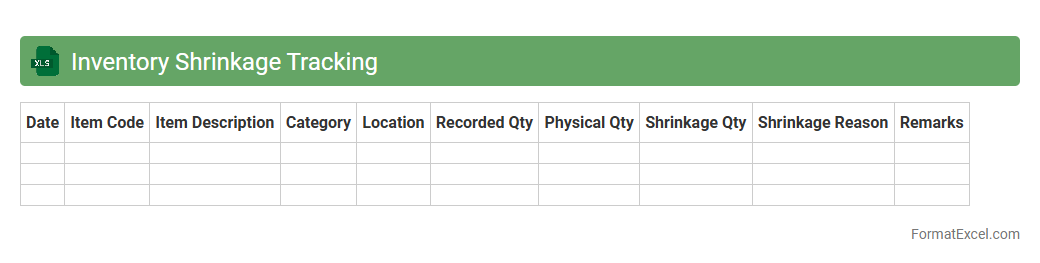
Inventory Shrinkage Tracking
Inventory Shrinkage Tracking Excel document is a powerful tool designed to monitor discrepancies between recorded inventory and actual stock levels. It helps businesses identify losses due to theft, damage, or administrative errors by providing detailed reports and analysis. Using this document enables companies to enhance inventory accuracy, reduce financial losses, and improve overall supply chain management through systematic tracking of shrinkage.
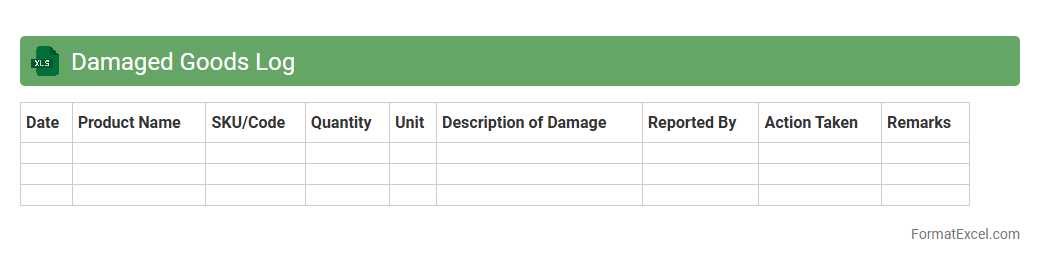
Damaged Goods Log
The
Damaged Goods Log Excel document is a structured tool used to record and track products that have been damaged during storage, handling, or transit. It helps businesses monitor the frequency, causes, and types of damages, enabling precise inventory control and minimizing losses. By analyzing this data, companies can implement preventive measures, improve supply chain efficiency, and maintain accurate financial reporting.
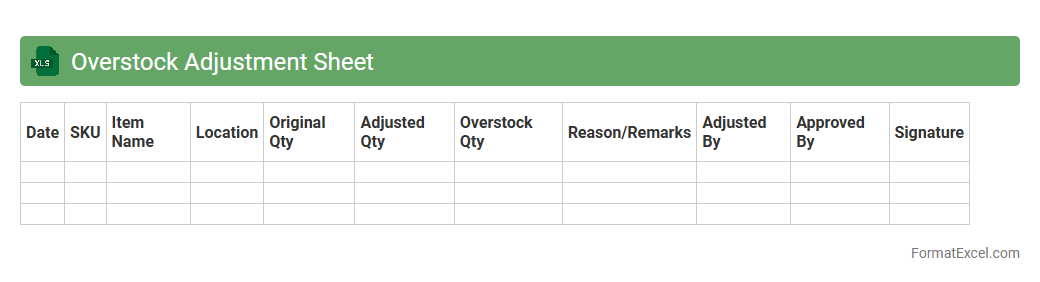
Overstock Adjustment Sheet
The
Overstock Adjustment Sheet Excel document is designed to track and manage excess inventory efficiently by recording stock discrepancies and adjustments in real-time. It helps businesses maintain accurate inventory levels, reduce carrying costs, and prevent stock obsolescence by providing clear visibility into overstock quantities. Utilizing this sheet improves decision-making for inventory replenishment and optimizes warehouse space management.
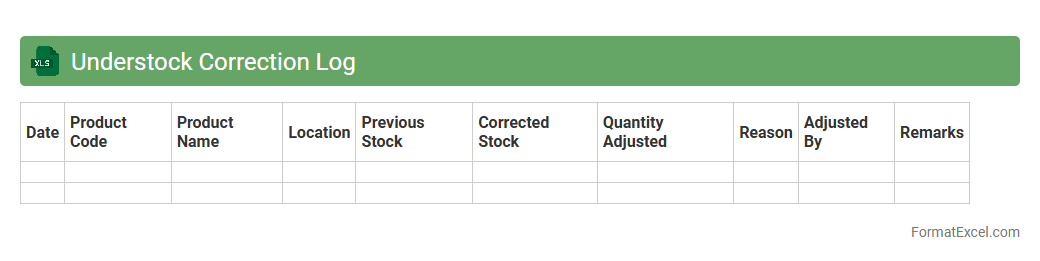
Understock Correction Log
The
Understock Correction Log Excel document is a detailed record used to track inventory shortages and the corrective actions taken to resolve them. It helps businesses identify recurring stock issues, monitor the efficiency of restocking processes, and improve overall inventory management accuracy. By maintaining this log, companies can reduce stockouts, enhance customer satisfaction, and optimize supply chain operations.
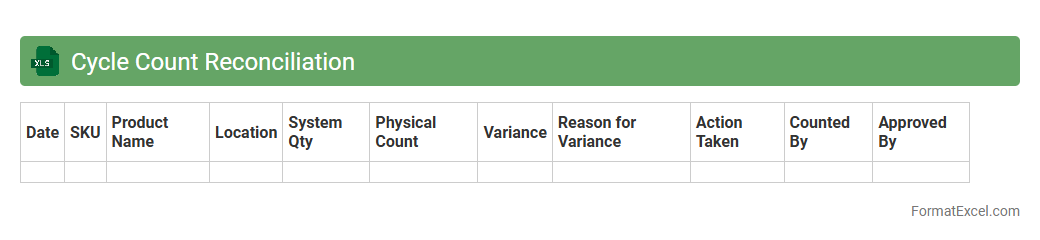
Cycle Count Reconciliation
Cycle Count Reconciliation Excel document is a tool designed to compare physical inventory counts against recorded inventory data to identify discrepancies. It streamlines inventory accuracy by highlighting variances, enabling businesses to correct errors promptly and maintain up-to-date records. Using this
inventory reconciliation method improves stock management, reduces shrinkage, and supports efficient supply chain operations.
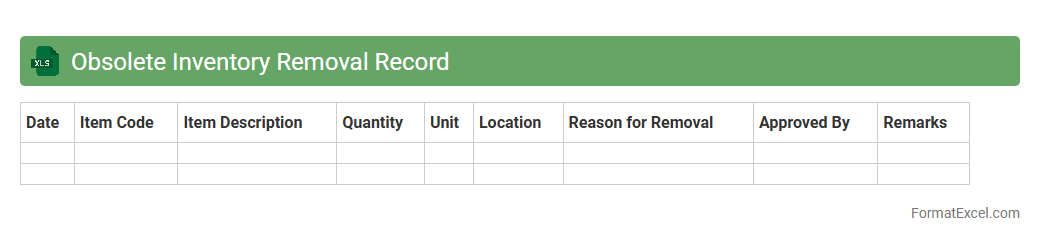
Obsolete Inventory Removal Record
The
Obsolete Inventory Removal Record Excel document tracks inventory items that are no longer sellable or usable, helping organizations manage excess or outdated stock effectively. This record facilitates accurate inventory valuation by documenting quantities, removal dates, and reasons for obsolescence, which supports better decision-making in inventory control and financial reporting. Using this document reduces storage costs, improves warehouse efficiency, and ensures compliance with accounting standards related to inventory management.
Returns Processing Record
The
Returns Processing Record Excel document is a structured spreadsheet designed to track and manage product returns efficiently. It helps businesses monitor return reasons, customer details, and refund statuses, streamlining communication between departments and enhancing customer service. By organizing return data systematically, the document enables quicker resolution of issues and better inventory management.
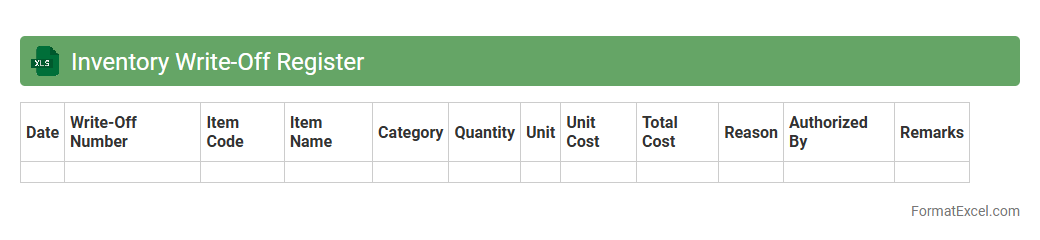
Inventory Write-Off Register
An
Inventory Write-Off Register Excel document is a practical tool for tracking and documenting inventory items that are obsolete, damaged, or lost, enabling accurate financial reporting and stock management. It facilitates reconciliation of inventory records by recording write-offs systematically, helping businesses identify patterns in inventory loss and implement corrective measures. Using this register improves transparency and accountability in inventory control, supporting better decision-making and minimizing discrepancies in stock valuation.
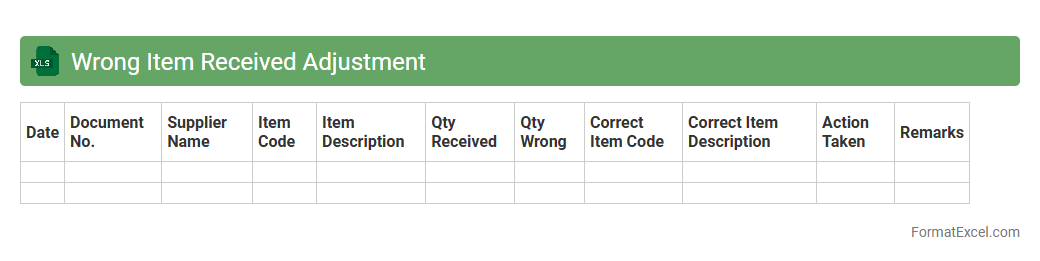
Wrong Item Received Adjustment
The
Wrong Item Received Adjustment Excel document is a specialized tool used to track and rectify discrepancies in received shipments by recording details such as item descriptions, quantities, and adjustment reasons. It streamlines the process of identifying incorrect deliveries, facilitating efficient communication with suppliers for returns or replacements. This document enhances inventory accuracy, reduces financial losses, and improves overall supply chain management.
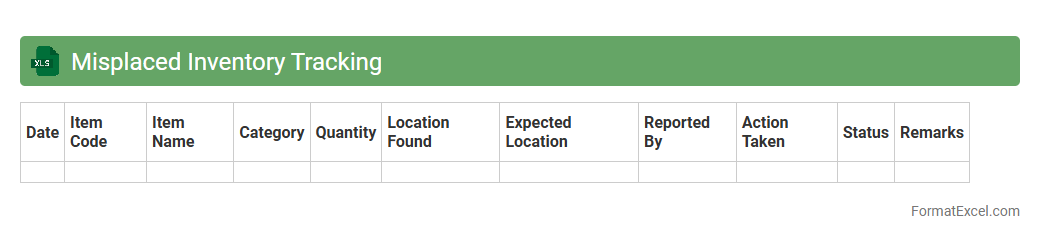
Misplaced Inventory Tracking
The
Misplaced Inventory Tracking Excel document is a powerful tool designed to identify, monitor, and manage inventory items that are stored incorrectly or lost within a warehouse. It helps businesses reduce inventory discrepancies, improve stock accuracy, and optimize warehouse operations by providing clear visibility into misplaced items. This tracking system enhances overall supply chain efficiency and minimizes costly errors related to inventory management.
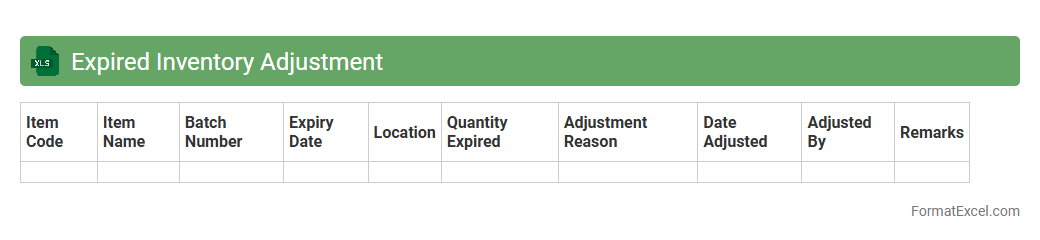
Expired Inventory Adjustment
The
Expired Inventory Adjustment Excel document is a critical tool for tracking products that have passed their expiration dates, enabling accurate inventory valuation and loss management. It helps businesses identify expired stock, calculate write-offs, and maintain compliance with financial reporting standards. Using this document improves inventory accuracy and supports informed decision-making for stock replenishment and waste reduction.
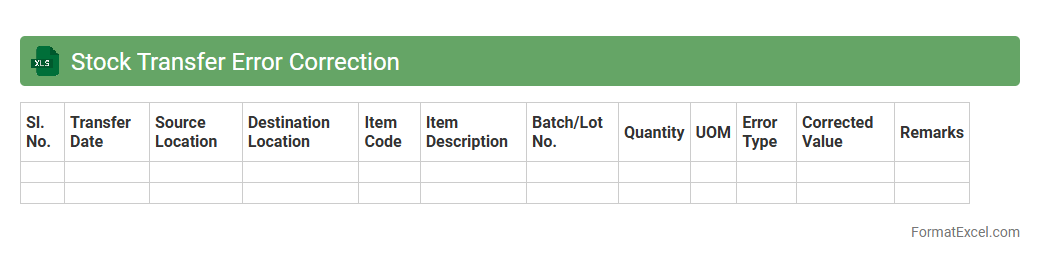
Stock Transfer Error Correction
The
Stock Transfer Error Correction Excel document is designed to identify and resolve discrepancies in inventory transfers between locations or departments. It helps streamline inventory management by accurately adjusting stock quantities, preventing data inconsistencies that can impact financial reporting and operational efficiency. Utilizing this tool improves accuracy in stock records, reduces errors, and supports better decision-making in supply chain management.
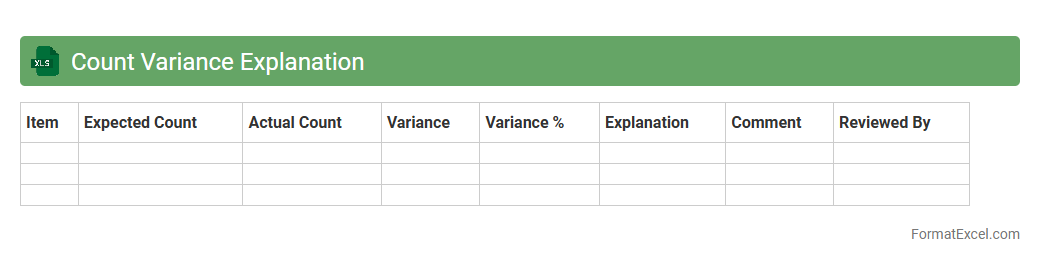
Count Variance Explanation
The
Count Variance Explanation Excel document is a detailed analytical tool designed to identify and quantify discrepancies in numerical data sets by calculating variances between actual and expected counts. This document helps users quickly pinpoint inconsistencies, making it essential for inventory management, financial audits, and quality control processes. Its structured format allows for easier interpretation of data trends and supports informed decision-making to improve operational accuracy and efficiency.
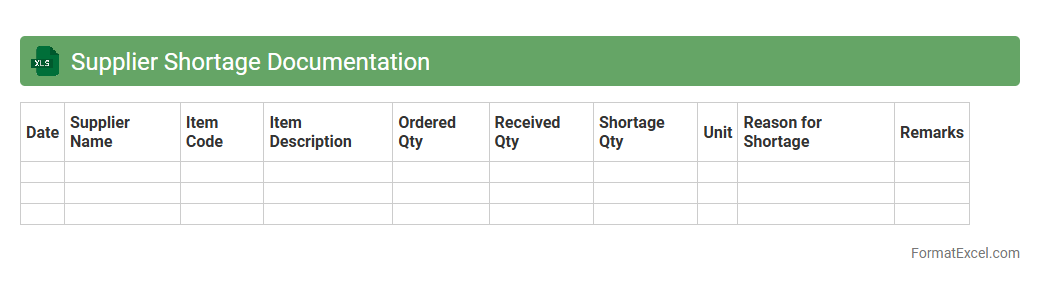
Supplier Shortage Documentation
The
Supplier Shortage Documentation Excel document is a tool designed to systematically record and track instances of supplier shortages, providing detailed information such as shortage dates, impacted materials, quantities, and supplier details. It enhances supply chain visibility, enabling proactive decision-making to mitigate production delays and maintain inventory levels. This document is essential for identifying patterns in supplier performance and improving communication with vendors to resolve recurring supply issues efficiently.
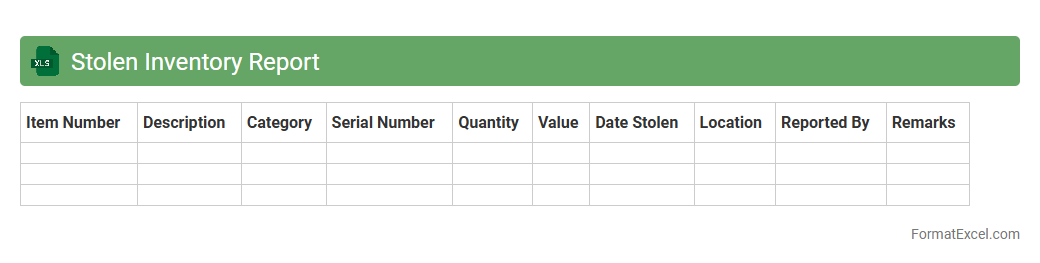
Stolen Inventory Report
A
Stolen Inventory Report Excel document systematically records details of missing or stolen items within an inventory, including item descriptions, quantities, dates, and locations of loss. This detailed tracking helps businesses identify patterns of theft, assess financial impact, and enhance security measures. Utilizing this report supports efficient inventory management and reduces losses by enabling timely investigations and preventive actions.
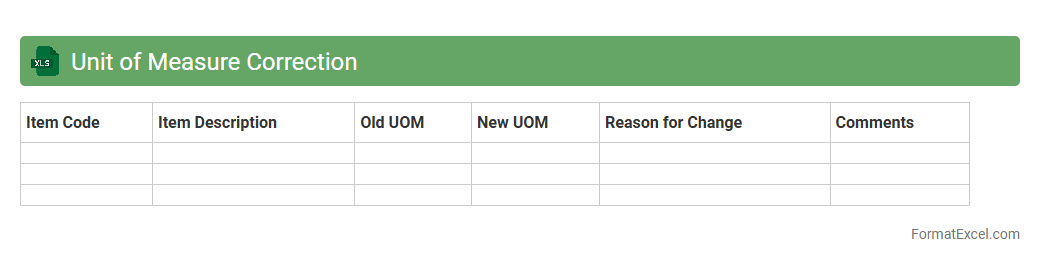
Unit of Measure Correction
The
Unit of Measure Correction Excel document is a tool designed to standardize and rectify discrepancies in measurement units across datasets, ensuring consistency in data analysis and reporting. By consolidating various units into a single, uniform format, it enhances accuracy in inventory management, financial calculations, and logistical planning. This document streamlines data processing, reduces errors, and supports effective decision-making in operational workflows.
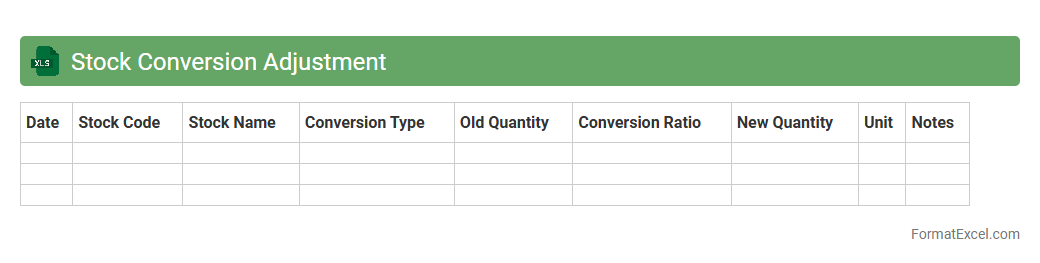
Stock Conversion Adjustment
The
Stock Conversion Adjustment Excel document tracks changes in stock quantities during unit conversions, ensuring accurate inventory management when products are measured in different units. It helps businesses maintain consistency in stock records, preventing discrepancies caused by converting bulk quantities to smaller units or vice versa. This tool is essential for optimizing supply chain accuracy and improving financial reporting related to stock levels.
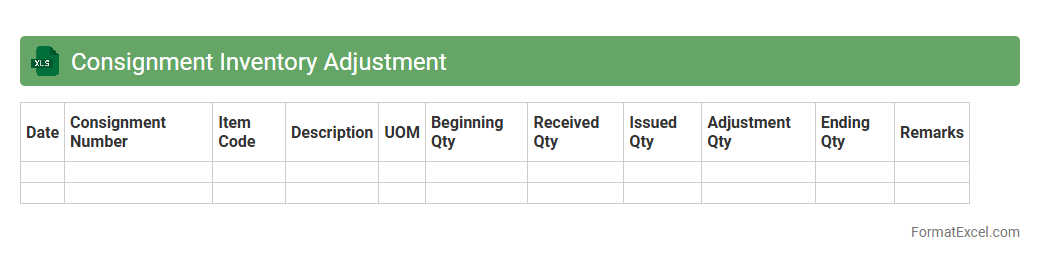
Consignment Inventory Adjustment
The
Consignment Inventory Adjustment Excel document is a specialized tool designed to track and manage inventory held on consignment, ensuring accurate records of stock levels, quantities sold, and adjustments made. It helps businesses maintain real-time visibility into consignment inventory, facilitating precise reconciliation between consignor and consignee accounts. This document streamlines inventory control, reduces discrepancies, and supports efficient financial reporting by documenting all changes in consignment stock.
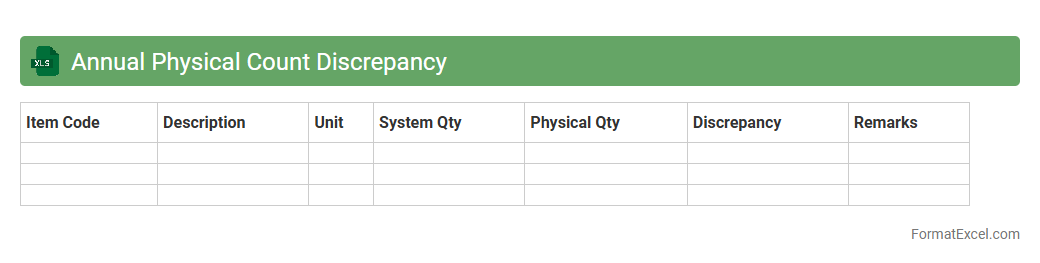
Annual Physical Count Discrepancy
The
Annual Physical Count Discrepancy Excel document tracks and compares the actual physical inventory against recorded inventory levels to identify differences or variances. It helps businesses uncover missing, excess, or misplaced stock, ensuring accurate inventory records and financial reporting. By analyzing discrepancies, companies can improve inventory management, reduce shrinkage, and enhance operational efficiency.
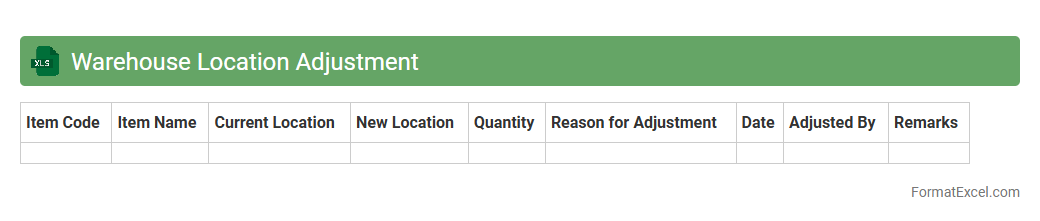
Warehouse Location Adjustment
The
Warehouse Location Adjustment Excel document is a tool designed to track and manage the reassignment of inventory items within various warehouse locations. It helps businesses maintain accurate stock levels by recording movements between storage areas, ensuring efficient space utilization and minimizing inventory discrepancies. This document supports better decision-making in logistics and inventory control by providing clear, organized data on warehouse adjustments.
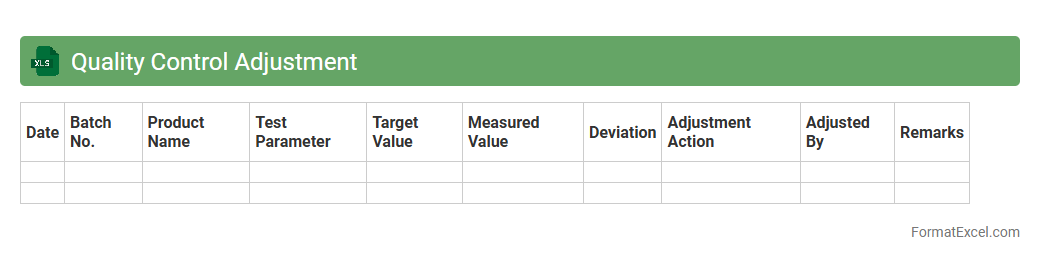
Quality Control Adjustment
The
Quality Control Adjustment Excel document is a tool designed to systematically track, analyze, and correct deviations in product or service quality metrics. It helps organizations maintain compliance with quality standards by providing clear visibility into inspection results, defect rates, and adjustment actions. This document enhances decision-making by enabling real-time monitoring and precise adjustments to optimize quality performance and reduce costly errors.
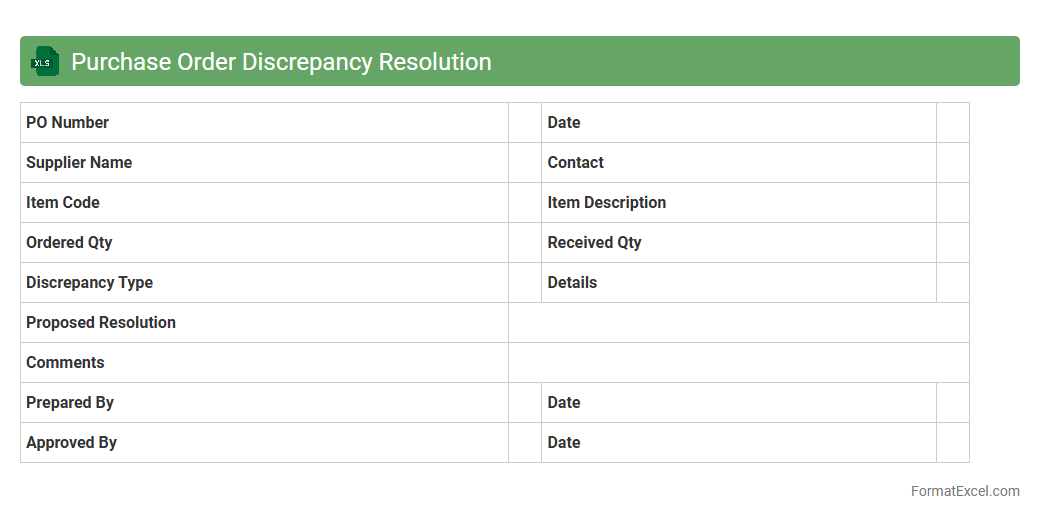
Purchase Order Discrepancy Resolution
The
Purchase Order Discrepancy Resolution Excel document is a structured tool designed to identify, track, and resolve inconsistencies between purchase orders and received goods or invoices. It helps businesses systematically manage variances such as quantity mismatches, pricing errors, or delivery discrepancies, ensuring accurate financial reconciliation. This document enhances operational efficiency by facilitating timely communication between procurement, suppliers, and finance departments, reducing payment delays and improving supplier relationships.
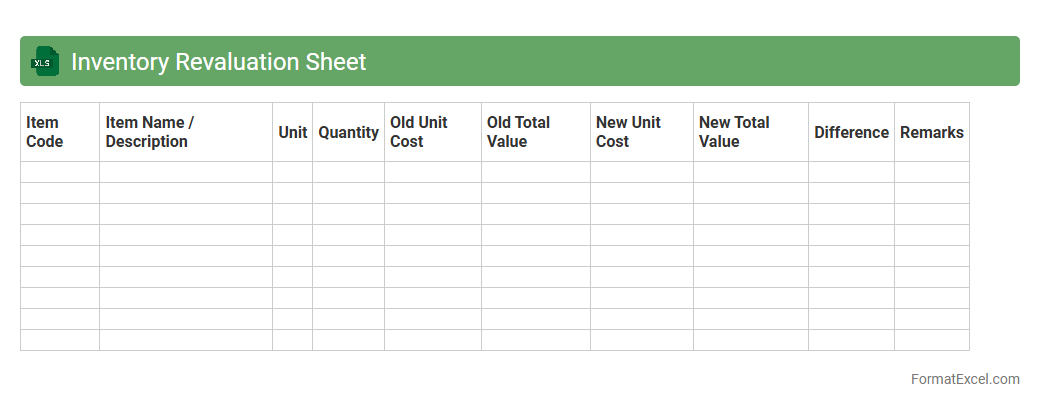
Inventory Revaluation Sheet
An
Inventory Revaluation Sheet Excel document is a tool used to track and update the value of inventory items based on their current market prices or conditions. It helps businesses accurately reflect inventory value on financial statements, ensuring compliance with accounting standards and providing a clear picture of asset worth. This sheet streamlines inventory audits, supports cost control, and aids in making informed purchasing or pricing decisions.
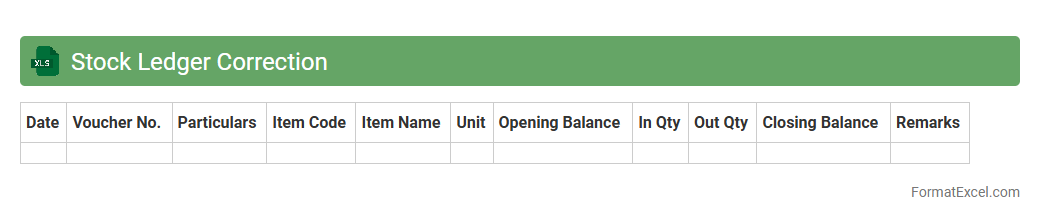
Stock Ledger Correction
A
Stock Ledger Correction Excel document is a tool designed to accurately track and rectify discrepancies in inventory records by providing a structured format for recording stock adjustments. It helps businesses maintain precise stock levels, minimize errors, and improve inventory management efficiency. By using this document, companies can ensure data integrity, streamline audits, and enhance decision-making related to supply chain and stock control.
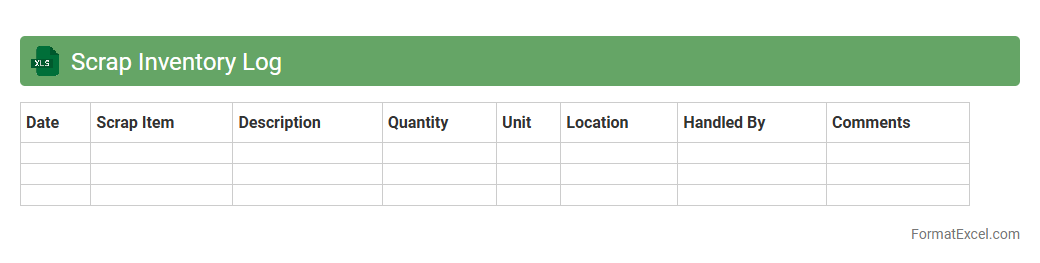
Scrap Inventory Log
A
Scrap Inventory Log Excel document is a structured spreadsheet used to systematically record and track discarded materials and defective products in manufacturing or production environments. It enhances inventory management by providing detailed insights into scrap quantities, causes, and associated costs, enabling businesses to identify inefficiencies and reduce waste. This log supports data-driven decision-making, improves cost control, and contributes to sustainability efforts by minimizing material loss.
Introduction to Inventory Adjustment in Excel
Inventory adjustment in Excel involves modifying inventory records to reflect accurate stock levels. Using Excel allows for easy tracking and updating of inventory data. Understanding the inventory adjustment process is crucial for managing stock efficiently.
Importance of Accurate Inventory Records
Accurate inventory records ensure proper stock management and prevent discrepancies. They support effective decision-making and avoid financial losses. Maintaining precise data is essential for business success.
Key Elements of an Inventory Adjustment Format
Key elements include inventory item details, adjustment reason, quantity changes, and date of adjustment. These components help track changes clearly. A well-structured inventory adjustment format improves data organization.
Essential Columns for Inventory Adjustment Sheets
Essential columns typically include Item ID, Description, Quantity Before, Adjustment Quantity, Quantity After, Adjustment Date, and Reason. These columns provide comprehensive information for each adjustment. Including these fundamental columns enhances the sheet's usability.
Step-by-Step Guide to Creating an Excel Inventory Adjustment Template
Start by creating headers for each essential column, then format cells for proper data entry. Use data validation to minimize input errors and maintain consistency. Following these steps will produce a functional Excel template for inventory adjustments.
Sample Inventory Adjustment Format in Excel
A typical sample includes columns for Item Code, Adjustment Type, Quantity Adjusted, and Balance. It demonstrates how adjustments are tracked over time. Viewing a sample format aids in understanding template structure.
Automating Calculations with Excel Formulas
Excel formulas like SUM and IF can automate quantity calculations and highlight discrepancies. Using formulas ensures real-time updates and reduces manual errors. Automated calculations increase efficiency and accuracy.
Tips for Maintaining Data Accuracy
Regularly reconcile physical inventory with records, use drop-down lists for consistent data, and double-check entries. Training staff on proper data entry also enhances accuracy. These accuracy tips help maintain reliable inventory data.
Common Mistakes to Avoid in Inventory Adjustments
Avoid mistakes such as skipping adjustment reasons, entering incorrect quantities, or neglecting to update records timely. These errors can lead to inventory discrepancies. Recognizing common pitfalls improves inventory management.
Downloadable Inventory Adjustment Excel Template
Many websites offer free downloadable templates tailored for inventory adjustments. These templates save time and provide a ready-made structure for recording changes. Accessing a downloadable template simplifies the adjustment process.